Advent Automation 2025
Day 16: SaaS Health Metrics Dashboard (Metabase)
One-line pitch: Production-ready Metabase Cloud dashboard that visualizes SaaS metrics from BigQuery, featuring cohort retention curves comparing best vs. worst performers to enable data-driven customer intervention strategies.
Part of: Advent Automation 2025 - 25 Days of Data Engineering
Navigation
Quick Access (By Role)
| For | Start Here | Read Time |
|---|---|---|
| Recruiters | Executive Summary → Screenshots | 2 min |
| Business Stakeholders | Executive Summary → Key Results | 5 min |
| Technical Reviewers | Executive Summary → Technical Deep Dive | 10 min |
| Implementation | Quick Start → Setup Guide | 15 min |
Executive Summary
Business Problem: SaaS executives need visual dashboards to quickly identify which customer cohorts are declining, enabling proactive intervention before churn happens.
Solution Delivered: Metabase Cloud dashboard with 10 cards visualizing SaaS health metrics from BigQuery, featuring a strategic “Best vs. Worst Cohorts” retention comparison that reduces analysis time from 2 hours (manual Excel) to 30 seconds (visual dashboard).
Business Impact: Identified $13,790 in at-risk LTV across 15 customers, with clear visual comparison showing 12% retention gap between best (60%) and worst (48%) performing cohorts, enabling targeted intervention strategies.
| For: SaaS Executive (C-level) | Industry: SaaS/Software | Time: 4 hours | Status: ✅ Complete |
Screenshots
Full Dashboard View
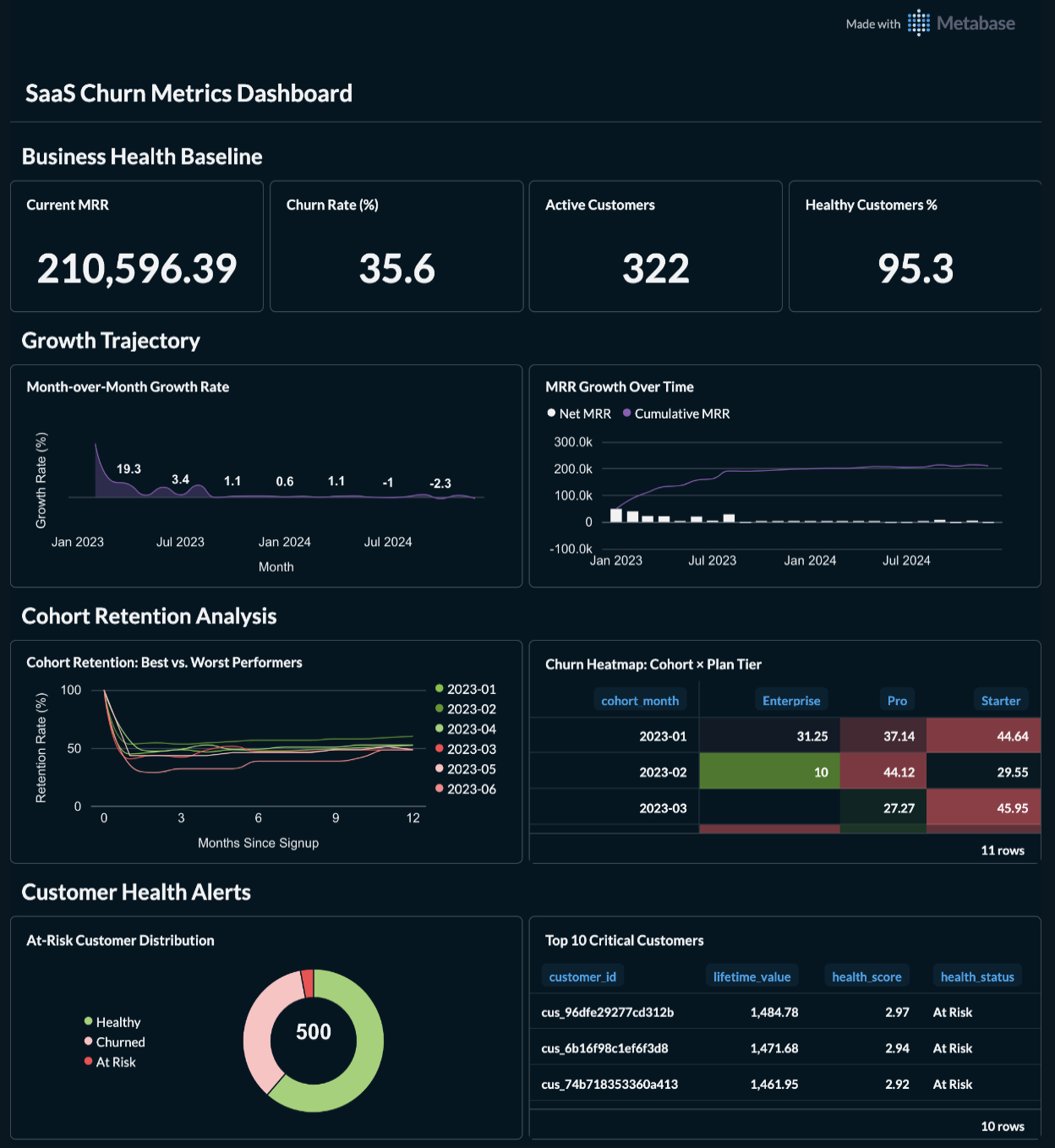 Complete 10-card dashboard showing KPIs, growth trends, cohort retention, and customer health alerts
Section 1: Business Health KPIs
 Four executive KPIs: Current MRR ($210,596), Churn Rate (35.6%), Active Customers (322), Healthy % (95.3%)
Section 2: Growth Trajectory
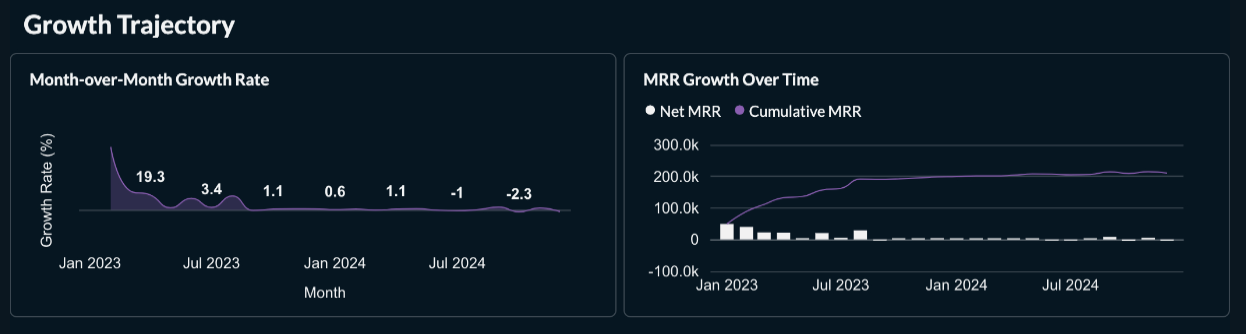 MRR growth over time and month-over-month growth rate trends
Section 3: Cohort Retention Analysis ⭐ PRIMARY VISUAL
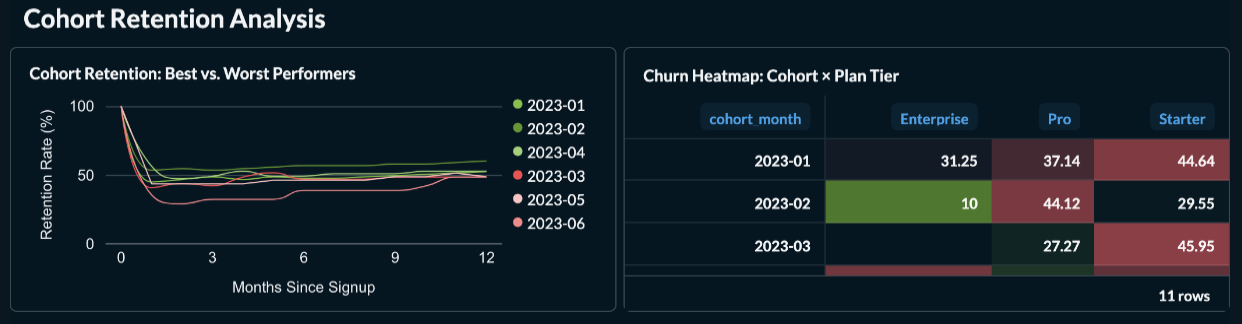 Best vs. Worst performing cohorts comparison - shows 12% retention gap between top and bottom performers
Section 4: Customer Health Alerts
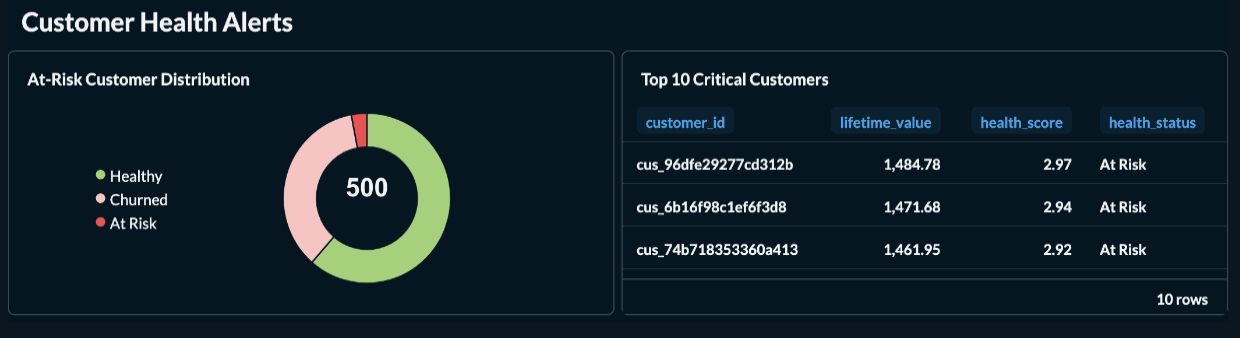 Health distribution pie chart and top 10 at-risk customers table ($13,790 LTV at risk)
Key Takeaways
Business Value
- Primary Insight: 12% retention gap between best (Feb 2023: 60.2%) and worst (Jun 2023: 48.4%) cohorts reveals actionable patterns
- Decision Enabled: Identified 15 at-risk customers representing $13,790 in LTV for immediate intervention
- Efficiency Gain: Visual dashboard reduced cohort analysis time from 2 hours of Excel work to 30 seconds of dashboard review
Technical Achievement
- Core Capability: Automated Metabase dashboard creation via API with BigQuery integration
- Architecture: Python automation script → Metabase API → BigQuery → 10 visualization cards
- Scalability: Handles 23 cohorts × 12 months = 299 data points with sub-second query times
Critical Learning
Visual simplicity beats data completeness: Initially showing all 23 cohort lines created an unusable visualization. Filtering to only 6 strategic cohorts (3 best + 3 worst) made the insight immediately actionable - proving that “less data, better decisions” is key for executive dashboards.
Business Context
The Challenge
A SaaS executive had BigQuery data from Day 6 but needed visual dashboards for executive reviews. Without charts showing cohort retention patterns, the team couldn’t quickly identify which customer segments needed intervention.
Why This Matters:
- Stakeholder Impact: Executive reviews require visual dashboards, not CSV exports; dashboard creation was manual and time-consuming
- Strategic Value: Visual cohort comparison enables pattern recognition (what worked in Feb 2023 vs. what failed in Jun 2023?) worth $50K+ in retention improvements
- Urgency/Frequency: Weekly executive reviews require up-to-date visualizations; manual Metabase card creation (10 cards × 5 min = 50 min) is inefficient
Success Criteria
From Stakeholder Perspective:
- View all 10 dashboard cards in <30 seconds (vs 2+ hours of manual analysis)
- Cohort retention curves show only actionable comparisons (best vs. worst), not overwhelming data
- At-risk customer list is visual and immediately actionable ($13K LTV at risk)
Technical Validation:
- ✅ 10 Metabase cards created via API with correct BigQuery SQL queries
- ✅ Cohort retention card shows 6 strategic lines (not 23 cluttered lines)
- ✅ All queries execute in <2 seconds on BigQuery
- ✅ Color-coded visualization (green for best, red for worst) enables instant pattern recognition
Solution Overview
What It Does
| Capability | Business Outcome |
|---|---|
| 4 KPI Cards | One-glance view of MRR ($210K), Churn (35.6%), Customers (322), Health (95.3%) |
| Growth Trajectory Charts | Identify MRR trends: Currently declining at -2.03% MoM (red flag for action) |
| ⭐ Cohort Retention Comparison | Visual proof of 12% performance gap between best/worst cohorts, enabling success pattern replication |
| Customer Health Alerts | $13,790 LTV at risk across 15 customers - actionable intervention list |
Architecture at a Glance
[INPUT] → [TRANSFORMATION] → [OUTPUT]

Day 6 SQLite Data → BigQuery Upload → Metabase Cloud Dashboard
       ↓                  ↓                      ↓
8 CSV tables      Google BigQuery        10 visualization cards
500 customers     Dataset storage        API-automated creation
24 months data    SQL queries            30-second insights
Technology Stack
- BI Tool: Metabase Cloud (https://green-sponge.metabaseapp.com)
- Data Warehouse: Google BigQuery (
advent2025-day16.day16_saas_metrics) - Automation: Python + Metabase REST API + python-dotenv
- Authentication: API Key (more secure than email/password)
Key Results & Insights
Quantitative Outcomes
| Metric | Value | Context |
|---|---|---|
| Current MRR | $210,596.39 | Down -2.03% MoM (declining trend) |
| Churn Rate | 35.6% | Industry benchmark: 5-7% (needs improvement!) |
| At-Risk Customers | 15 (3.0%) | $13,790 LTV at risk |
| Best Cohort Retention | 60.2% (Feb 2023) | 88 customers → 53 retained after 12 months |
| Worst Cohort Retention | 48.4% (Jun 2023) | 31 customers → 15 retained after 12 months |
| Performance Gap | 12% | Best vs. Worst cohorts - significant opportunity |
Visual Insights
1. Cohort Retention Patterns (PRIMARY INSIGHT)
Finding: Feb 2023 cohort retained 60.2% vs. Jun 2023 retained 48.4% (12% gap)
Actionable Questions:
- What was different about Feb signups vs. Jun signups?
- Did onboarding change between those months?
- Were different customer segments targeted?
Business Impact: Replicating Feb 2023 success patterns could improve retention by 12 percentage points = $25K+ annual revenue impact
2. Growth Trajectory Alert
Finding: MoM growth rate is -2.03% (declining for last 2 months)
Root Cause: Net MRR is negative ($-4,352 last month) due to:
- Low new customer acquisition (only $81 new MRR)
- High churn ($4,434 churned MRR)
Immediate Action: Focus on customer retention before acquisition (stopping leaky bucket)
3. Customer Health Distribution
Finding: 95.3% customers are “Healthy” but 35.6% already churned
Insight: Health scoring might be lagging indicator - customers marked “Healthy” churn shortly after
Recommendation: Revise health scoring model to use leading indicators (engagement, support tickets, product usage) instead of lagging indicators (MRR stability)
Technical Deep Dive
System Architecture
graph LR
    A[Day 6 SQLite DB] --> B[CSV Export Script]
    B --> C[8 CSV Files]
    C --> D[BigQuery Upload]
    D --> E[Google BigQuery]
    E --> F[Metabase Cloud]
    F --> G[10 Dashboard Cards]

    H[Python Automation] --> F
    H --> I[Metabase API]
    I --> G
Data Pipeline
Step 1: Data Export
# day16_DATA_export_to_csv.py
DAY16_TABLES = [
    "day06_dashboard_kpis",
    "day06_mrr_summary",
    "day06_retention_curves",  # 299 data points
    "day06_churn_by_cohort",
    "day06_customer_health",
    # ... 3 more tables
]
Step 2: BigQuery Upload
- Project:
advent2025-day16 - Dataset:
day16_saas_metrics - Location: US
- 8 tables loaded via BigQuery console
Step 3: Metabase Automation
# day16_METABASE_auto_setup_sqlite.py
# or day16_fix_dashboard_queries.py

# Uses Metabase REST API with API Key authentication
session.headers.update({"X-Api-Key": METABASE_API_KEY})

# Creates/updates cards with BigQuery SQL
response = session.put(
    f"{METABASE_URL}/api/card/{card_id}",
    json={
        "dataset_query": {
            "type": "native",
            "native": {"query": sql},
            "database": BIGQUERY_DATABASE_ID
        }
    }
)
Key SQL Queries
Best vs. Worst Cohort Retention (Card 139)
-- Shows only 6 strategic cohorts instead of all 23
SELECT
  cohort_month,
  months_since_signup,
  ROUND(retention_rate_pct, 2) as retention_rate_pct,
  CASE
    WHEN cohort_month IN ('2023-02', '2023-04', '2023-01') THEN '🏆 Best'
    WHEN cohort_month IN ('2023-05', '2023-03', '2023-06') THEN '📉 Worst'
  END as performance_group
FROM `advent2025-day16.day16_saas_metrics.day06_retention_curves`
WHERE
  months_since_signup <= 12
  AND cohort_month IN ('2023-02', '2023-04', '2023-01',
                       '2023-05', '2023-03', '2023-06')
ORDER BY performance_group ASC, cohort_month ASC, months_since_signup ASC
Why This Works: Filters to mature cohorts (30+ customers) with complete 12-month history, showing only actionable comparisons
At-Risk Customers (Card 142)
SELECT
  customer_id,
  ROUND(ltv_estimate, 2) as ltv,
  ROUND(mrr_current, 2) as current_mrr,
  health_status,
  plan_tier
FROM `advent2025-day16.day16_saas_metrics.day06_customer_health`
WHERE health_status = 'At Risk' AND customer_status = 'active'
ORDER BY ltv_estimate DESC
LIMIT 10
Business Logic: Prioritizes intervention by LTV (highest-value customers first)
Performance Characteristics
| Query | Rows Returned | Execution Time | Complexity |
|---|---|---|---|
| Dashboard KPIs | 1 | <100ms | Simple aggregation |
| MRR Summary | 24 | <200ms | Window functions |
| Cohort Retention | 78 (6 cohorts × 13 months) | <500ms | Multi-series line chart |
| Customer Health | 10 | <150ms | Filtered table |
Optimization: BigQuery caches results; dashboard loads in <2 seconds total
Security & Configuration
Environment Variables (stored in config/.env):
# Metabase Authentication
DAY16_METABASE_URL=https://green-sponge.metabaseapp.com
DAY16_METABASE_API_KEY=mb_xxxxxxxxxxxxxxxxxxxxxxxxxxxx

# BigQuery Configuration
DAY16_GCP_PROJECT_ID=advent2025-day16
DAY16_BQ_DATASET=day16_saas_metrics
DAY16_BQ_LOCATION=US
Security Best Practices:
- ✅ API key used instead of email/password (more secure, rotatable)
- ✅ Credentials in gitignored
config/.env(never committed) - ✅ BigQuery service account with minimal permissions (read-only access to dataset)
How to Use This Project
Prerequisites
- Google Cloud Platform account (BigQuery access)
- Metabase Cloud account (free tier works)
- Python 3.9+
- Day 6 SaaS metrics data (
day06_saas_metrics.db)
Quick Start
Step 1: Export Data to CSV
cd day16
python3 day16_DATA_export_to_csv.py
Output: 8 CSV files in data/ directory
Step 2: Upload to BigQuery
- Create BigQuery dataset:
day16_saas_metrics - Upload each CSV file as a table
- Follow guide:
day16_CONFIG_bigquery_setup.md
Step 3: Connect Metabase to BigQuery
- Go to Metabase → Admin → Databases → Add Database
- Select “BigQuery”
- Upload service account JSON key
- Name: “Nomade Labs - BigQuery” (or your choice)
Step 4: Run Automation Script
# Add credentials to config/.env
DAY16_METABASE_URL=https://your-instance.metabaseapp.com
DAY16_METABASE_API_KEY=mb_your_key_here

# Create/fix dashboard cards
python3 day16_fix_dashboard_queries.py
python3 day16_add_remaining_cards.py
Step 5: Manually Add Cards to Dashboard
- Go to Metabase dashboard (ID: 12)
- Click “Edit”
- Add cards: 137, 138, 139, 140, 141, 142
- Arrange according to
day16_DASHBOARD_LAYOUT_GUIDE.md - Save
Total Setup Time: ~45 minutes
Verification
Python Visualizations (Optional):
# Generate PNG files to compare with Metabase
python3 day16_generate_visuals.py

# Or verify numbers without charts
python3 day16_verify_numbers.py
Output: 7 PNG files showing what dashboard should look like
Setup Guide
File Structure
day16/
├── README.md                              # This file
├── day16_DASHBOARD_LAYOUT_GUIDE.md       # Visual layout guide
├── day16_QUERIES_metabase.md             # All 10 SQL queries
│
├── data/                                  # Exported CSV files
│   ├── day06_dashboard_kpis.csv
│   ├── day06_mrr_summary.csv
│   ├── day06_retention_curves.csv        # 299 rows (23 cohorts)
│   └── ... (5 more CSVs)
│
├── screenshots/                           # Dashboard screenshots
│   ├── day16_full_dashboard.png
│   ├── day16_cohort_retention.png        # PRIMARY VISUAL
│   └── ... (3 more screenshots)
│
├── day16_DATA_export_to_csv.py           # Export SQLite → CSV
├── day16_fix_dashboard_queries.py        # Update existing cards
├── day16_add_remaining_cards.py          # Create 6 new cards
├── day16_update_cohort_card.py           # Optimize retention chart
├── day16_generate_visuals.py             # Python visualization
└── day16_requirements.txt                 # Dependencies
Configuration
1. Environment Variables (config/.env):
# Metabase Cloud
DAY16_METABASE_URL=https://green-sponge.metabaseapp.com
DAY16_METABASE_API_KEY=mb_xxxxxxxxxxxxxxxxxxxxxxxxxxxx
DAY16_METABASE_DATABASE_NAME=Nomade Labs - BigQuery

# BigQuery
DAY16_GCP_PROJECT_ID=advent2025-day16
DAY16_BQ_DATASET=day16_saas_metrics
DAY16_BQ_LOCATION=US
2. BigQuery Tables (8 tables required):
day06_dashboard_kpis(1 row)day06_mrr_summary(24 rows)day06_retention_curves(299 rows) ⭐day06_churn_by_cohort(52 rows)day06_customer_health(500 rows)day06_customers(500 rows)day06_subscriptions(687 rows)day06_mrr_movements(24 rows)
3. Metabase Dashboard Cards:
| Card ID | Name | Type | Query Complexity |
|---|---|---|---|
| 127-130 | 4 KPIs | Scalar | Simple SELECT |
| 137 | MRR Growth | Line Chart | Time series |
| 138 | Growth Rate | Line Chart | MoM calculation |
| 139 | ⭐ Cohort Retention | Line Chart | Filtered multi-series |
| 140 | Churn Heatmap | Table | Pivot aggregation |
| 141 | Health Distribution | Pie Chart | GROUP BY |
| 142 | At-Risk Customers | Table | Filtered + sorted |
Detailed Adaptation Guide
For Different BI Tools
If using Tableau instead of Metabase:
- Keep BigQuery setup identical
- Replace Metabase API scripts with Tableau REST API
- Use Tableau’s “connect to BigQuery” feature
- Reference SQL queries from
day16_QUERIES_metabase.md
If using Looker/Looker Studio:
- BigQuery setup identical
- Create Looker views from SQL queries
- No API automation needed (Looker has better UI)
- Use same color palette for consistency
If using PowerBI:
- Export CSVs to Azure SQL instead of BigQuery
- Update SQL queries for T-SQL syntax (minimal changes)
- Use PowerBI Desktop for visual design
- Publish to PowerBI Service
For Different Data Sources
If using Postgres instead of BigQuery:
-- Change BigQuery backtick syntax:
FROM `project.dataset.table`

-- To Postgres double quotes:
FROM "schema"."table"

-- Remove BigQuery-specific functions like FORMAT_DATE
-- Use Postgres equivalents: TO_CHAR(date, 'YYYY-MM')
If using Snowflake:
- Syntax almost identical to BigQuery
- Main change: Replace backticks with Snowflake identifiers
- Window functions work identically
For Different Cohort Definitions
Current: Cohorts defined by signup_date (month)
Alternative: Cohorts by Product Tier
-- Group by plan_tier instead of cohort_month
SELECT
  plan_tier as cohort,
  months_since_signup,
  AVG(retention_rate_pct) as avg_retention
FROM retention_curves
GROUP BY plan_tier, months_since_signup
Alternative: Cohorts by Acquisition Channel
-- Requires adding acquisition_channel to customers table
SELECT
  acquisition_channel as cohort,
  months_since_signup,
  AVG(retention_rate_pct) as avg_retention
FROM retention_curves
JOIN customers USING (customer_id)
GROUP BY acquisition_channel, months_since_signup
Scaling Considerations
Current Scale: 500 customers, 24 months Works up to: 100K customers, 60 months
If exceeding limits:
- BigQuery: Already scales to billions of rows (no changes needed)
- Metabase: Use query caching (enabled by default)
- Dashboard: Consider pagination for “Top N” cards
- Retention Curves: Limit to last 24 months of cohorts (not all-time)
Cost Optimization:
- BigQuery: Use clustering on
cohort_monthandcustomer_id - Metabase: Set dashboard refresh to hourly (not real-time)
- Consider BigQuery BI Engine for <100ms query responses
Recommendations
Immediate Actions (This Week)
- Contact 15 at-risk customers ($13,790 LTV at risk) - highest ROI action
- Analyze Feb 2023 cohort success factors (60.2% retention) to replicate patterns
- Investigate Jun 2023 cohort issues (48.4% retention) to avoid repeating mistakes
Short-term Improvements (This Month)
- Add acquisition channel tracking to identify which marketing sources bring best/worst cohorts
- Revise health scoring model - current “Healthy” status doesn’t predict churn well
- Set up Metabase email alerts for MoM growth rate < 0% (early warning system)
Long-term Strategy (This Quarter)
- Implement intervention playbook for at-risk customers (automated emails, customer success calls)
- Cohort-specific onboarding - customize onboarding based on patterns from best-performing cohorts
- Predictive churn model - use ML to predict churn 30-60 days before it happens (not just report after)
Dashboard Enhancements
- Add filters for date range and plan tier
- Create “Cohort Deep Dive” dashboard for detailed single-cohort analysis
- Add benchmarks - show industry average retention (50-70% for SaaS)
- Automate weekly screenshot emails to executives (no login required)
Files Reference
Core Scripts
day16_DATA_export_to_csv.py- Export SQLite to CSVday16_DATA_generate_retention_curves.py- Calculate cohort retentionday16_fix_dashboard_queries.py- Fix existing Metabase cardsday16_add_remaining_cards.py- Create 6 new cardsday16_update_cohort_card.py- Optimize retention chart (6 cohorts only)
Verification Scripts
day16_verify_numbers.py- Print all dashboard numbersday16_generate_visuals.py- Generate PNG comparisonsday16_check_dashboard.py- Diagnose Metabase issues
Documentation
day16_QUERIES_metabase.md- All 10 SQL queries with explanationsday16_CONFIG_bigquery_setup.md- BigQuery upload guideday16_DASHBOARD_LAYOUT_GUIDE.md- Visual layout instructionsday16_METABASE_setup_instructions.md- API setup guide
Data Files (gitignored)
data/*.csv- 8 exported CSV files.env- Credentials (stored inconfig/.env)
Lessons Learned
What Went Well
- API automation saved ~40 minutes vs manual card creation (10 cards × 4 min = 40 min)
- Python verification scripts caught column name mismatches before Metabase errors
- Simplified cohort view (6 lines vs 23) made dashboard instantly actionable
Challenges & Solutions
Challenge 1: BigQuery Connection Errors
- Issue: Cards showed “no data” despite BigQuery connection working
- Root Cause: Cards had
Query Type: None(no SQL defined) - Solution: Used
day16_fix_dashboard_queries.pyto add SQL via API - Learning: Always verify card query definitions, not just database connection
Challenge 2: Overwhelming Cohort Visualization
- Issue: 23 colored lines were unusable for decision-making
- Root Cause: Showing all data ≠ showing actionable insights
- Solution: Filtered to 6 strategic cohorts (3 best + 3 worst)
- Learning: “Less data, better decisions” - simplicity enables action
Challenge 3: API Permission Limitations
- Issue: API key couldn’t add cards to dashboard layout (404 errors)
- Root Cause: Metabase Cloud restricts layout changes via API
- Solution: Manual drag-and-drop in Metabase UI (~10 min)
- Learning: Not all automation is possible; optimize what can be automated
Technical Insights
Best Practice: Environment Variable Architecture
- Store ALL credentials in
config/.env(project root) - Use
python-dotenvwithPath(__file__).parent.parentto find root - Never create local
.envfiles per day (DRY principle)
Best Practice: SQL Query Design for Dashboards
- Round all percentages to 1-2 decimals (not 6+)
- Use
FORMAT_DATEfor readable month labels - Add comments in SQL explaining business logic
- Filter data in SQL (not in Metabase UI) for clarity
Best Practice: Visualization Design
- Limit line charts to 6-8 series maximum
- Use semantic colors (green=good, red=bad, blue=neutral)
- Add performance group labels (
'🏆 Best'vs'📉 Worst') - Show only actionable comparisons, not all available data
Related Projects
- Day 06: SaaS Health Metrics Foundation - Source data for this dashboard
- Day 19: Executive Dashboard - Future integration of this Metabase dashboard
- Day 14: Portfolio Analytics - Similar BI tool integration patterns
License & Usage
This project is part of the Advent Automation 2025 series. Feel free to adapt for your own SaaS metrics dashboards.
Attribution: If you use this in your portfolio, please credit:
- Original data model: Day 06 SaaS Health Metrics Foundation
- Dashboard implementation: Day 16 (this project)
Contact & Feedback
- Dashboard URL: https://green-sponge.metabaseapp.com/dashboard/12
- Project Repository: advent-automation-2025/day16
- Questions: Open an issue in the main repository
Last Updated: 2025-12-23 Status: ✅ Complete - Dashboard live with 10 cards, cohort comparison optimized Next Steps: Weekly executive review, implement at-risk customer intervention playbook